





Is this your AI tool? Claim it today.
Verify ownership, manage your profile, and unlock growth features.
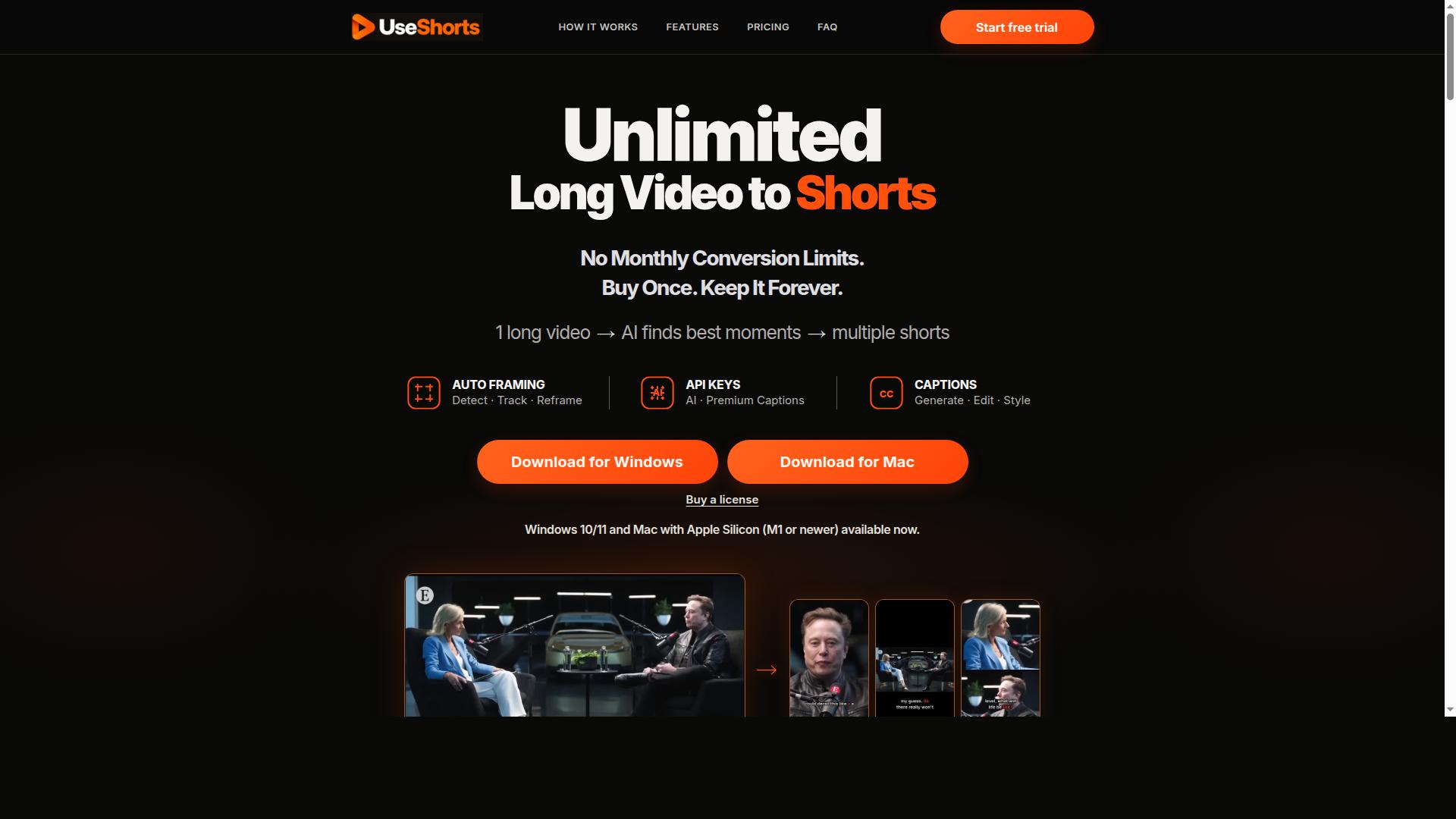
UseShorts is a desktop AI-powered video clipper that effortlessly transforms long videos into multiple engaging short clips with features like AI clip discovery, automatic reframing, and editable captions. Perfect for content creators and marketers seeking unlimited conversions without monthly fees, it offers a one-time purchase for Windows and Apple Silicon Macs.

Description
Shorty Studio allows you to turn any text into beautiful looking shorts. The platform combines text-to-speech models and user-created AI images into a ready-to-post video. Users own these videos and can export to any social platform.
Detailed Description
UseShorts is a powerful desktop application designed to transform lengthy videos, podcasts, and interviews into engaging short-form clips using advanced AI technology. Its core purpose is to simplify and accelerate the process of content repurposing by automatically identifying the most compelling moments within long videos and converting them into multiple short clips optimized for social media and other platforms. This tool caters to content creators, marketers, podcasters, and video editors who want to maximize the reach and impact of their long-form content without spending hours manually clipping and editing videos. One of the standout capabilities of UseShorts is its AI clip discovery feature, which intelligently scans through long videos to detect highlights and key moments that are likely to resonate with audiences. This eliminates the tedious task of scrubbing through hours of footage to find shareable segments. Additionally, the software offers automatic reframing, which uses AI-powered auto framing to detect, track, and reframe subjects within the video. This ensures that clips are perfectly composed for vertical or square formats commonly used in social media stories and reels, enhancing viewer engagement. Another important feature is the editable captions functionality. UseShorts can automatically generate captions for clips, which users can then edit and style to match their branding or accessibility requirements. This is particularly valuable for platforms where videos are often viewed without sound. The software supports both Windows 10/11 and Apple Silicon Macs (M1 or newer), ensuring compatibility with modern desktop environments. Unlike subscription-based services, UseShorts offers unlimited video conversions with no monthly caps, and it is available through a one-time purchase license valid for use on a single computer. This pricing model is attractive for users seeking long-term value without recurring fees. UseShorts is ideal for a wide range of users including social media managers who need to create frequent short clips from webinars or interviews, podcasters looking to promote episodes with highlight reels, educators repurposing lecture recordings, and video marketers aiming to increase engagement through bite-sized content. Its ability to automatically find and reframe clips saves significant time and effort, allowing users to focus on content strategy rather than manual editing. In terms of pricing, UseShorts is offered as a one-time purchase priced at $79.90 USD, which grants lifetime access to the software on one computer. This contrasts with many competitors that operate on subscription models, making UseShorts a cost-effective solution for individuals and small teams. A free trial is available, enabling potential users to experience the software’s capabilities before committing to purchase. Compared to alternatives, UseShorts stands out for its desktop-based operation, which can be preferable for users with privacy concerns or those who prefer offline editing. Its combination of AI clip discovery, automatic reframing, and editable captions in a single package is comprehensive and user-friendly. However, it is limited to Windows and Apple Silicon Macs, excluding Intel-based Macs and other operating systems. Also, the license restricts use to one computer, which may be a consideration for teams requiring multi-seat licenses. Overall, UseShorts offers a robust and efficient solution for anyone looking to convert long videos into engaging short clips with minimal manual effort. Its AI-driven features, unlimited conversions, and one-time purchase model make it an attractive choice for content creators focused on maximizing their video content’s reach and impact.
Tool Features
- AI clip discovery to find best moments in long videos
- Automatic reframing with auto framing to detect, track, and reframe subjects
- Editable captions with generation and styling options
- Supports Windows 10/11 and Apple Silicon Macs (M1 or newer)
- Unlimited video conversions with no monthly limits
- One-time purchase license for use on one computer
Description
UseShorts is a desktop AI-powered video clipper that effortlessly transforms long videos into multiple engaging short clips with features like AI clip discovery, automatic reframing, and editable captions. Perfect for content creators and marketers seeking unlimited conversions without monthly fees, it offers a one-time purchase for Windows and Apple Silicon Macs.
Shorty Studio allows you to turn any text into beautiful looking shorts. The platform combines text-to-speech models and user-created AI images into a ready-to-post video. Users own these videos and can export to any social platform.
Detailed Description
UseShorts is a powerful desktop application designed to transform lengthy videos, podcasts, and interviews into engaging short-form clips using advanced AI technology. Its core purpose is to simplify and accelerate the process of content repurposing by automatically identifying the most compelling moments within long videos and converting them into multiple short clips optimized for social media and other platforms. This tool caters to content creators, marketers, podcasters, and video editors who want to maximize the reach and impact of their long-form content without spending hours manually clipping and editing videos. One of the standout capabilities of UseShorts is its AI clip discovery feature, which intelligently scans through long videos to detect highlights and key moments that are likely to resonate with audiences. This eliminates the tedious task of scrubbing through hours of footage to find shareable segments. Additionally, the software offers automatic reframing, which uses AI-powered auto framing to detect, track, and reframe subjects within the video. This ensures that clips are perfectly composed for vertical or square formats commonly used in social media stories and reels, enhancing viewer engagement. Another important feature is the editable captions functionality. UseShorts can automatically generate captions for clips, which users can then edit and style to match their branding or accessibility requirements. This is particularly valuable for platforms where videos are often viewed without sound. The software supports both Windows 10/11 and Apple Silicon Macs (M1 or newer), ensuring compatibility with modern desktop environments. Unlike subscription-based services, UseShorts offers unlimited video conversions with no monthly caps, and it is available through a one-time purchase license valid for use on a single computer. This pricing model is attractive for users seeking long-term value without recurring fees. UseShorts is ideal for a wide range of users including social media managers who need to create frequent short clips from webinars or interviews, podcasters looking to promote episodes with highlight reels, educators repurposing lecture recordings, and video marketers aiming to increase engagement through bite-sized content. Its ability to automatically find and reframe clips saves significant time and effort, allowing users to focus on content strategy rather than manual editing. In terms of pricing, UseShorts is offered as a one-time purchase priced at $79.90 USD, which grants lifetime access to the software on one computer. This contrasts with many competitors that operate on subscription models, making UseShorts a cost-effective solution for individuals and small teams. A free trial is available, enabling potential users to experience the software’s capabilities before committing to purchase. Compared to alternatives, UseShorts stands out for its desktop-based operation, which can be preferable for users with privacy concerns or those who prefer offline editing. Its combination of AI clip discovery, automatic reframing, and editable captions in a single package is comprehensive and user-friendly. However, it is limited to Windows and Apple Silicon Macs, excluding Intel-based Macs and other operating systems. Also, the license restricts use to one computer, which may be a consideration for teams requiring multi-seat licenses. Overall, UseShorts offers a robust and efficient solution for anyone looking to convert long videos into engaging short clips with minimal manual effort. Its AI-driven features, unlimited conversions, and one-time purchase model make it an attractive choice for content creators focused on maximizing their video content’s reach and impact.
Frequently Asked Questions
What is UseShorts?
UseShorts is a desktop application that uses AI to automatically convert long videos, podcasts, and interviews into multiple short clips, featuring AI clip discovery, automatic reframing, and editable captions.
How much does UseShorts cost?
UseShorts is available for a one-time purchase price of $79.90 USD, which grants lifetime access for use on one computer without any monthly subscription fees.
Who is UseShorts best for?
UseShorts is ideal for content creators, social media managers, podcasters, educators, and video marketers who want to quickly create engaging short-form content from longer videos.
What are the main features of UseShorts?
Key features include AI clip discovery to find the best moments, automatic reframing with subject tracking, editable and stylable captions, unlimited video conversions, and support for Windows 10/11 and Apple Silicon Macs.
Does UseShorts offer a free trial?
Yes, UseShorts provides a free trial so users can test the software’s capabilities before purchasing a license.
What integrations does UseShorts support?
UseShorts is a standalone desktop application and does not currently advertise direct integrations with other platforms, focusing instead on local video processing and export.
How does UseShorts work?
UseShorts uses AI to analyze long videos, automatically identifying highlight moments, reframing subjects for vertical or square formats, and generating editable captions to produce multiple short clips quickly and efficiently.
Reviews
No reviews yet. Be the first to share your experience.